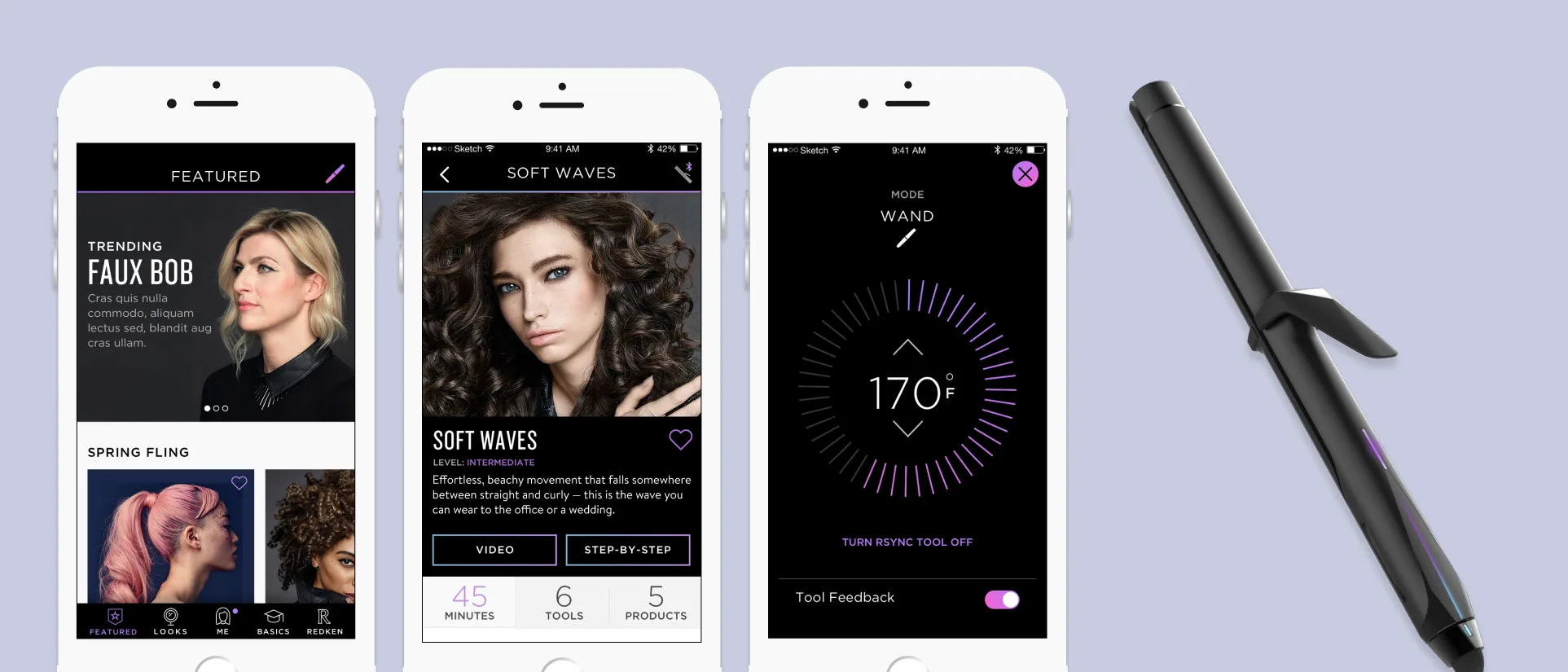
Executive Summary
Redken RSYNC: A Connected Tool That Coaches Instead of Styling for You
Company
Redken, L’Oréal
Timeline
2016 – 2017
Project
Connected Styling Tool
My Role
Creative Director & IxD Lead
The Problem
- This was Redken’s first styling tool of any kind, and the plan was to make a splash by launching it connected, which meant defining, from a standing start, what a connected app and tool should do for someone styling their own hair.
- The styling session itself left almost no attention to spare: wet hair, a hot tool in one hand, and a mirror to work in
- Left to themselves, people did not know how to use a styling tool well: heat set too high, the tool held too long or not long enough against the hair, hair still too wet to style safely
Outcome
- Acted as strategic advisor on the product definition from the brief onward, working with Redken and the hardware team to develop a connected styling device into a defined product: real safety and technique feedback from the tool, and expert step-by-step instruction matched to the user’s own hair
- Fully designed a first-generation connected experience (build a profile, choose a look, connect the tool, follow the steps, receive feedback) rather than a styling tool with a remote control bolted on
- Ran two rounds of testing with 32 participants total at the L’Oréal Professional Academy, each styling start to finish
My Role
- Strategic partner on the product definition for the connected device, then interaction designer and information architect for the app experience
- Creative director for the visual design team and lead for the development team
Detailed Case Study
Context and Challenge
Why This Problem Mattered
Redken was entering hardware for the first time, and the plan was to launch that first tool connected. We came in as strategic partners on the product definition. The challenge was not pairing a tool to a phone but defining a compelling, useful reason for the connection to exist. We developed an experience: a styling journey that starts with finding your style in the app and ends in the bathroom, as the phone and tool work together to make styling as safe and effective as possible.
What had to be defined
The brief described a hardware, connectivity, and software ecosystem: the raw capability. What it still needed was the experience that capability added up to, from finding a look through finishing it, and that was the work we were brought in to do
Why it was hard
Styling is physical. Hands are occupied, hair is wet, the tool is hot, and everything happens in a mirror. Every design decision had to survive an environment with almost no attention left over
Strategic risk
Connectivity in name only is a marketing line, and a look-book app is something anyone could ship without the hardware. Neither would have justified the product. RSYNC needed a throughline of action and value running between the device and the app.
My Role and Decision Ownership
I contributed to the strategy for the connected device and the app experience, and owned the design and delivery of that experience from there, framing the work around the full product system of hardware, connectivity, content, and app rather than a set of isolated mobile screens.
I directed three designers and two researchers on this work.
Interaction Design & IA
Defined the structure and interaction model of the app (how looks, profiles, tutorials, and live tool states fit together) and designed the tutorial, connected feedback, and moisture check experiences
Creative Direction
Directed the visual designers, holding the experience to Redken’s brand while making sure it stayed legible at arm’s length in a mirror
Development Lead
Led the development team, translating the tutorial and connected feedback flows into work that could be built against the hardware as it evolved
Approach & Execution
Turning the Brief into a Product Definition
The brief set out hardware, connectivity, and software, and a shared ambition to build something useful with them. Working through it with Redken and the hardware team, we defined the product against the jobs it had to do for the person holding the tool, and against the line running through them. Each job had to hand off to the next, ending at the tool itself.
Find a look worth trying
Browsing styles worth attempting, and learning what each one demands before committing to it
Know what your hair needs
Translating that look into what your own hair type requires, rather than settings meant for someone else’s
Style it safely with the tool
Reaching the look with the tool already set correctly, without damaging the hair on the way to it
Finding the Right Way to Deliver Instruction
While the hardware team built the device, my team spent weeks at L’Oréal’s New York research location working with customers on how they wanted to receive instruction. It came down to how a person learns: some wanted to watch a stylist do it, others to be walked through it a step at a time. The app had to cater to both.
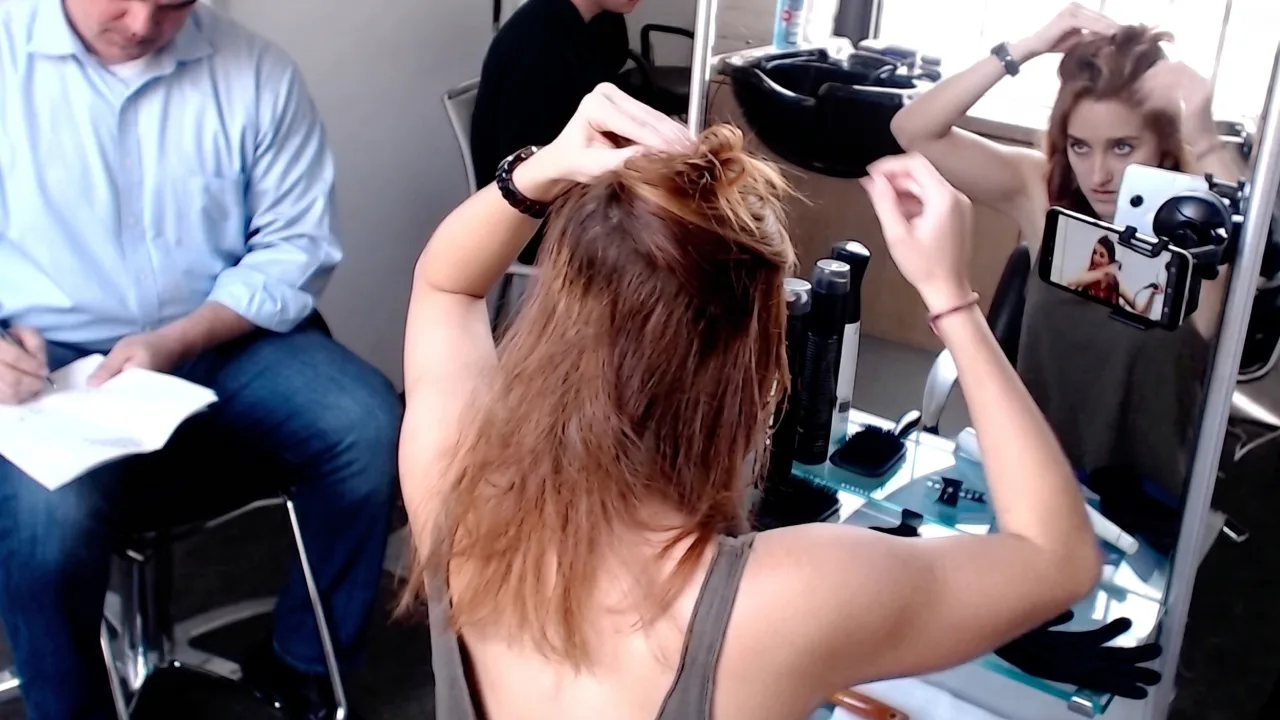
At the Research Station
Participants styled start to finish, phone mounted on the mirror, Redken’s tools and products at the station
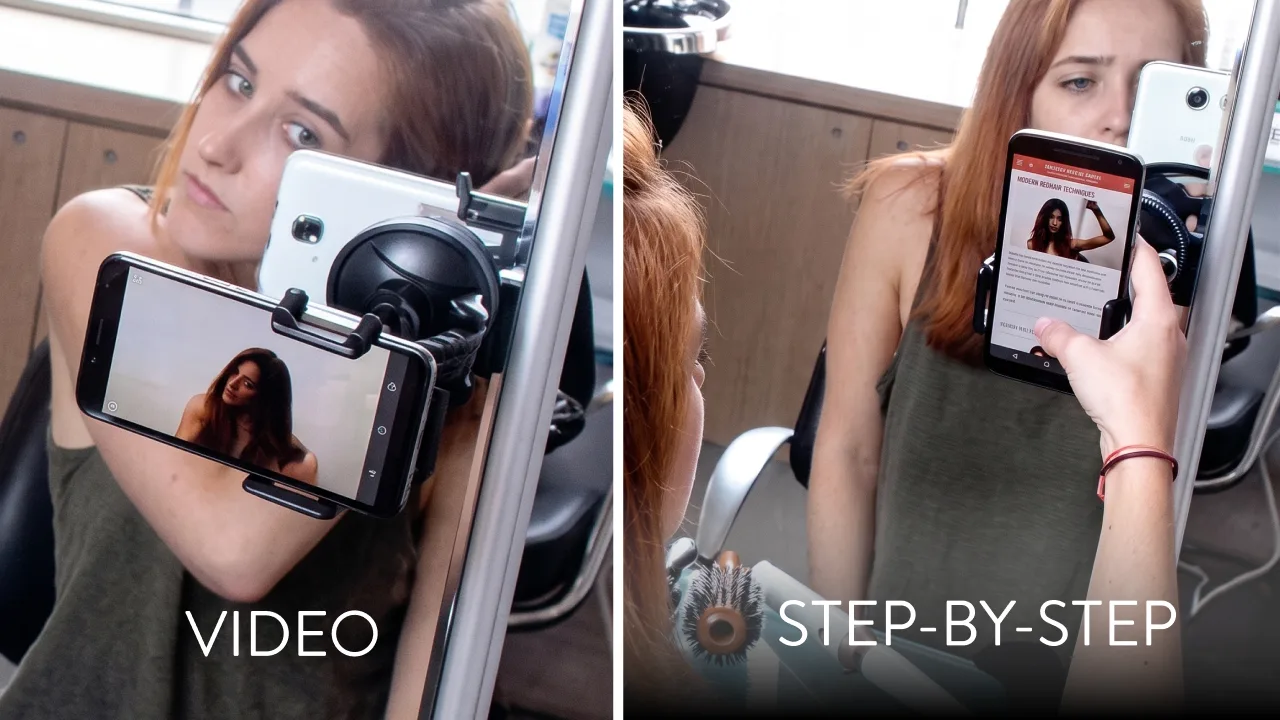
Two Ways to Be Taught
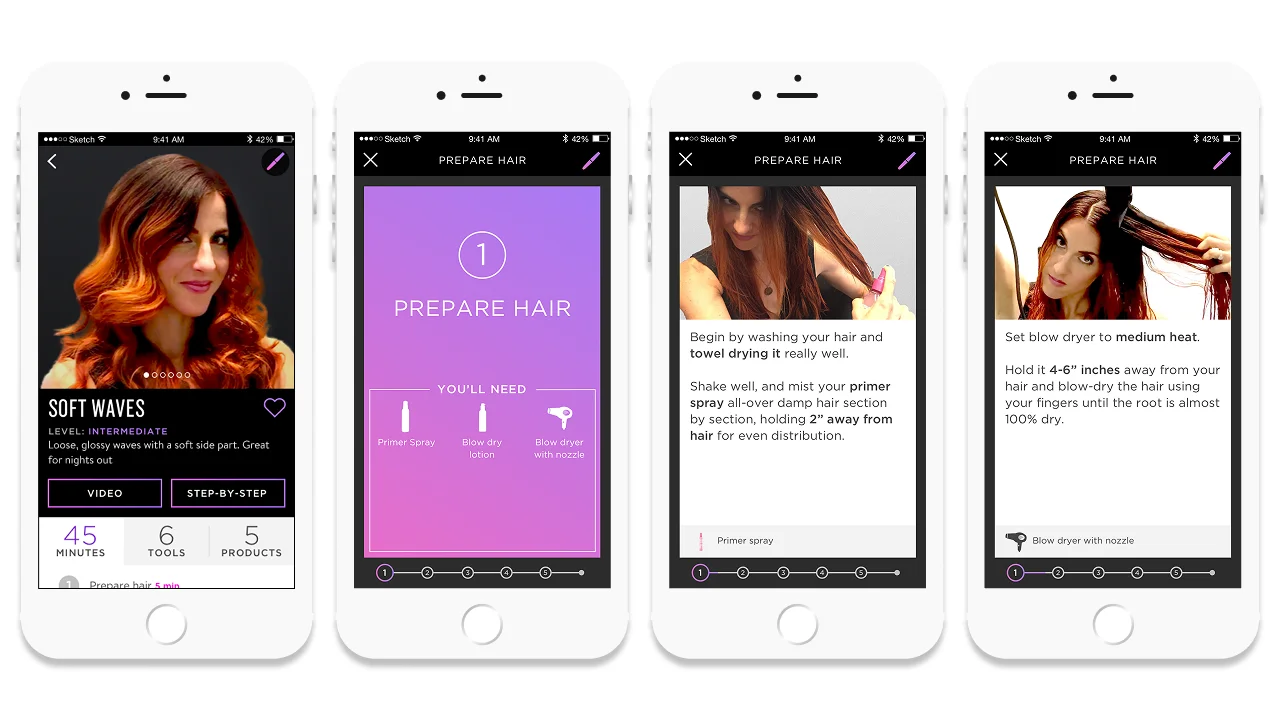
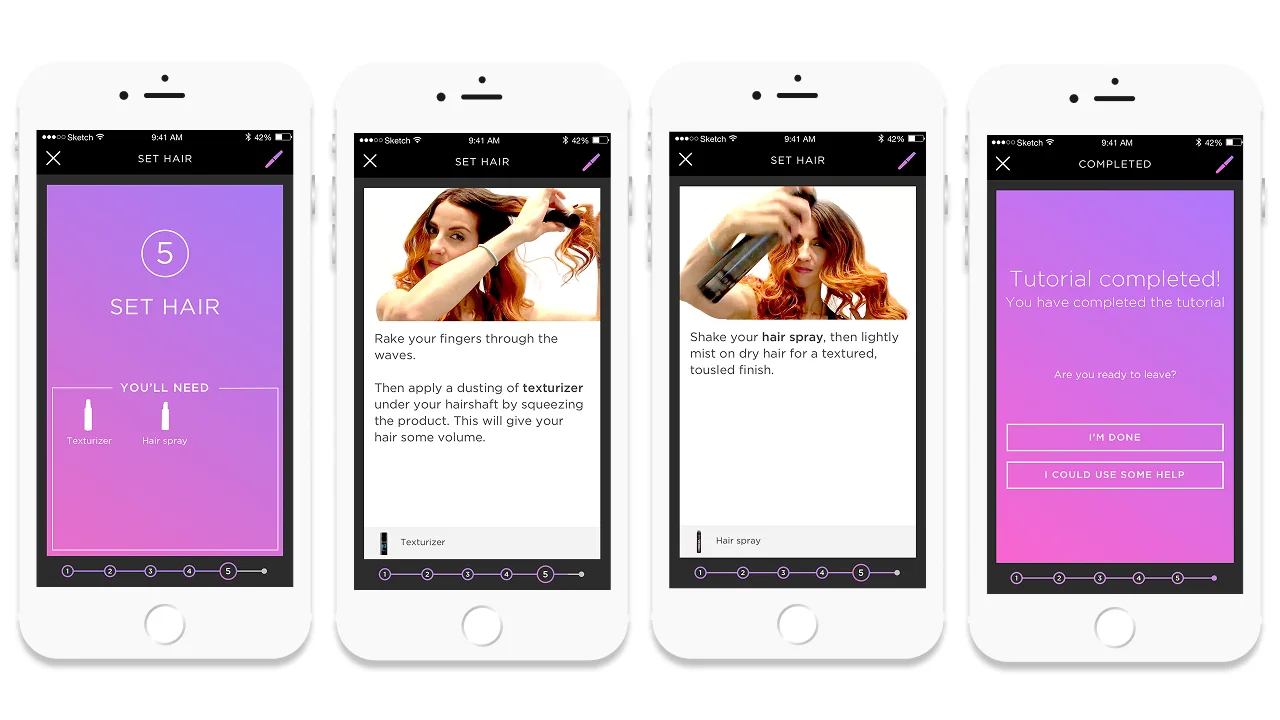
Video for people who wanted to watch the technique; paced step-by-step for people who wanted their own speed
Two rounds at the L’Oréal Professional Academy, 32 participants in all, tested it end to end, and surfaced what only a real setting reveals: how people divide attention between the phone, the mirror, their hair, and the tool in their hand.
Exploring the Design Language
I led the design team through design language directions drawn from Redken’s brand heritage. We presented three.

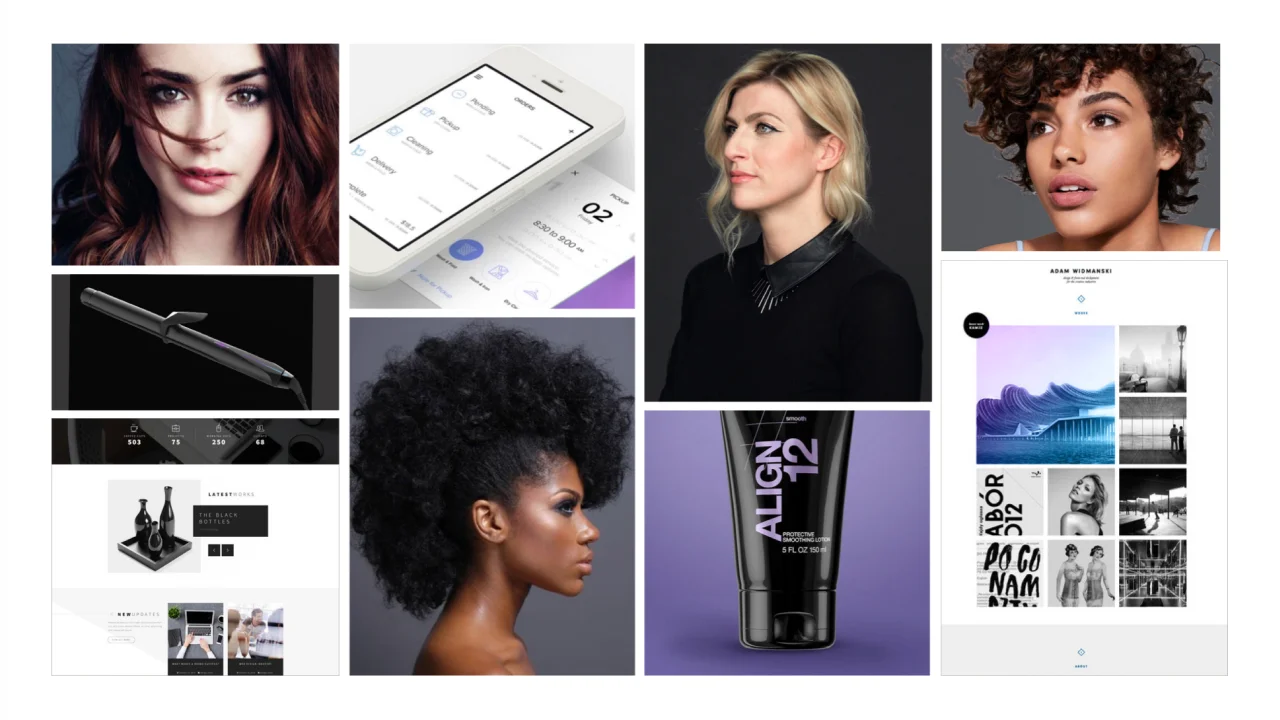
Concept 1 · Redken New York: Moodboard
Urban · Edgy · Energetic · Confident: from the Redken style guide and the brand’s New York attitude.
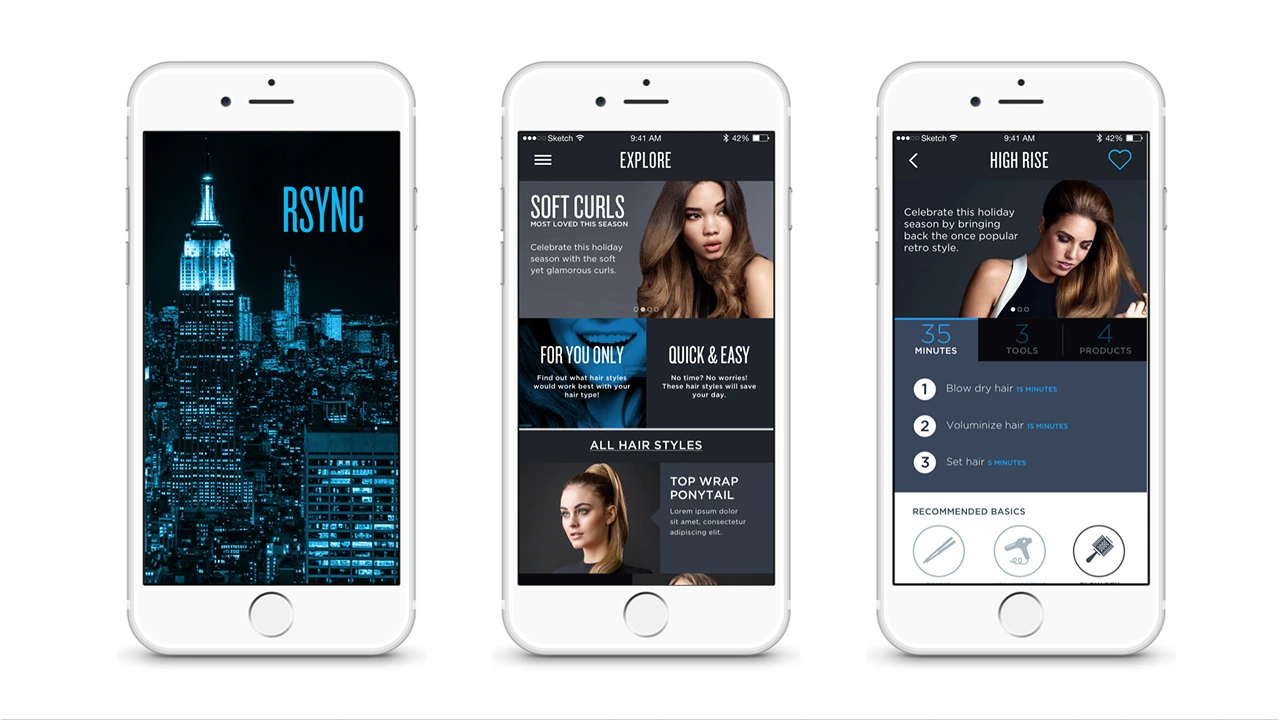
Concept 1 · Redken New York: Screen Designs
Concept 2 · Led by the Tool: Moodboard
Professional · High-End · Sleek · Modern: from the tool’s own minimal industrial design, color used selectively.
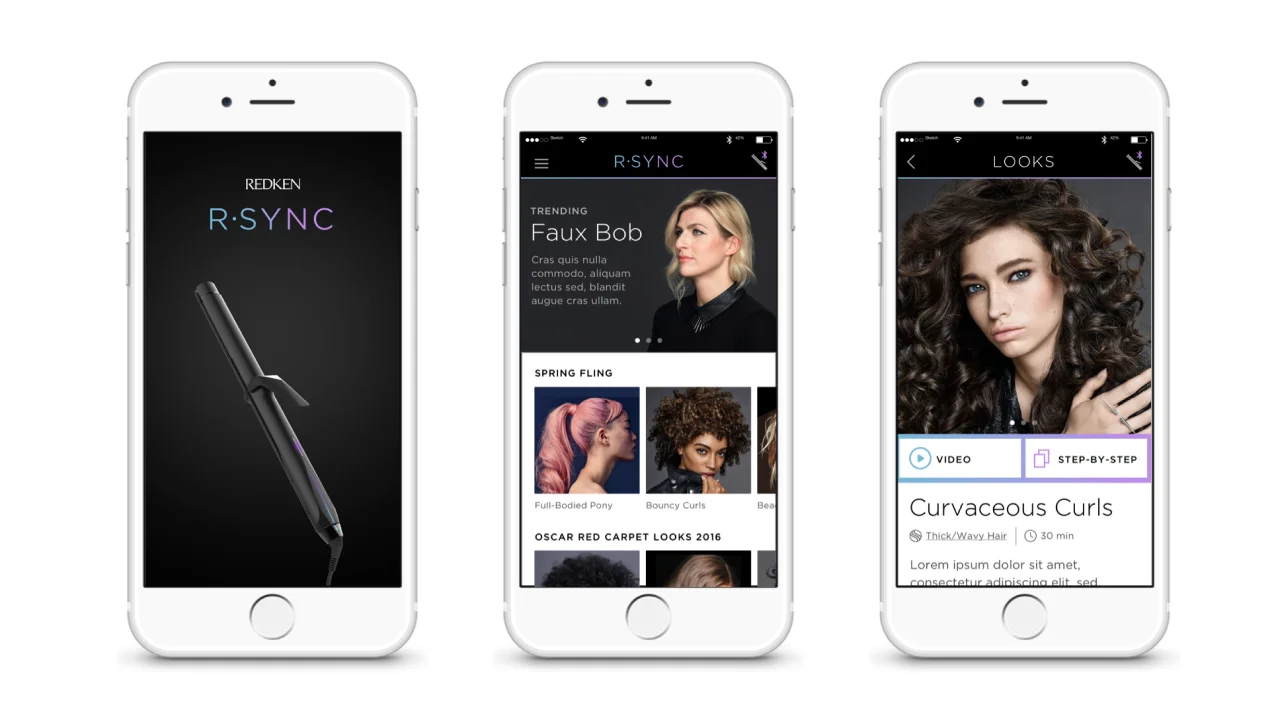
Concept 2 · Led by the Tool: Screen Designs
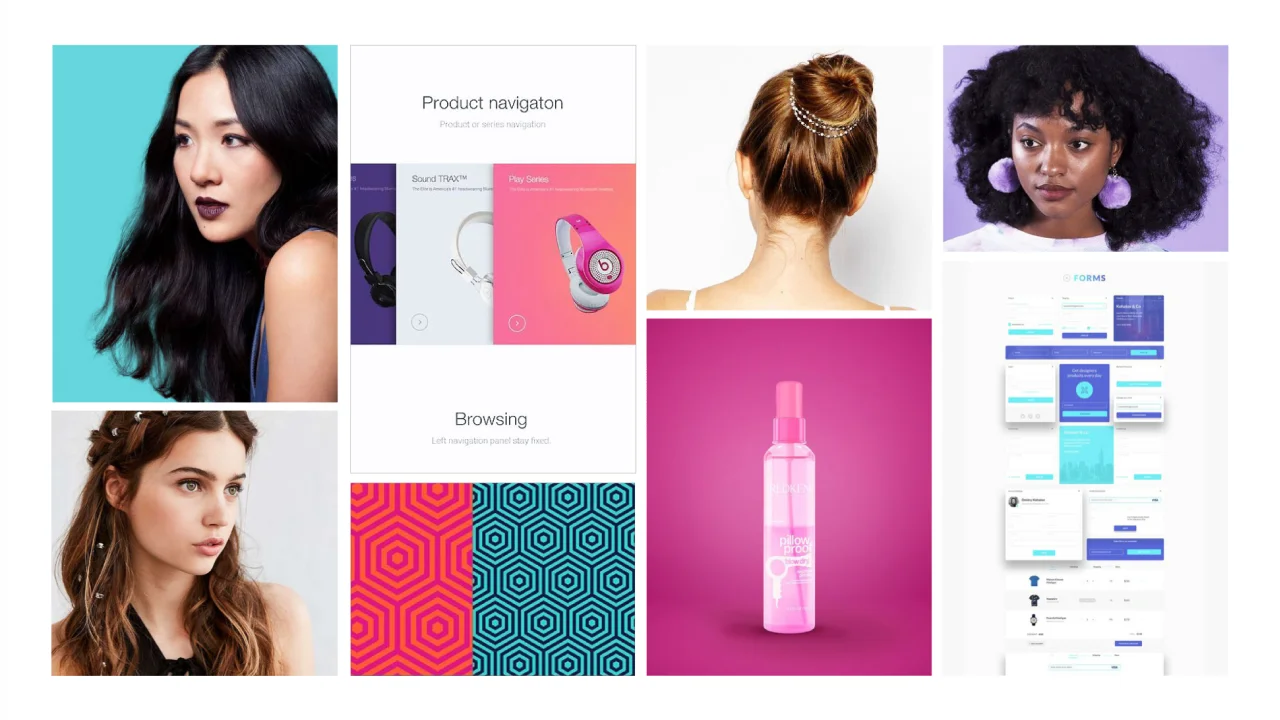
Concept 3 · Consumer First: Moodboard
Approachable · Bold · Uplifting · Casual: welcoming, with bold color that encourages rather than intimidates.
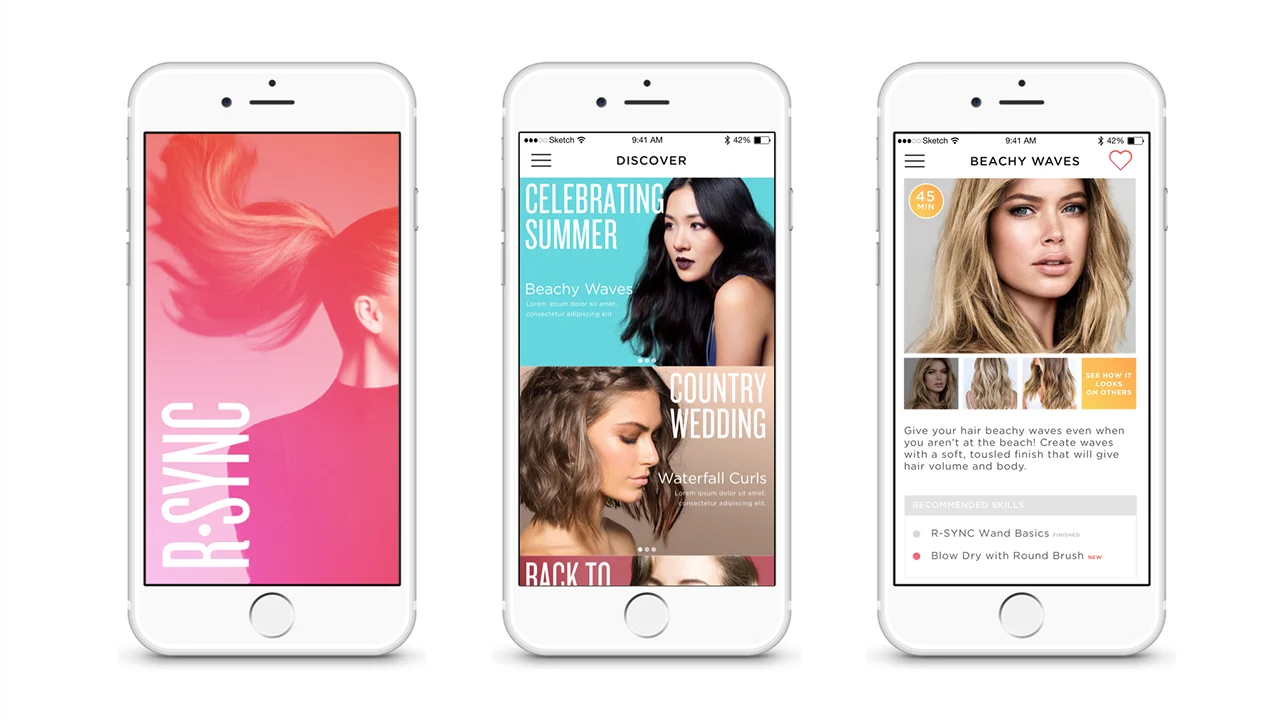
Concept 3 · Consumer First: Screen Designs
Redken selected Concept 2, and it became the design language the app was built in.
Defining the Content System
Looks and campaigns had to change on Redken’s schedule, not an app release schedule, so we also defined the content management system behind the experience (requirements, data model, and UX design) for the third-party partner building it.
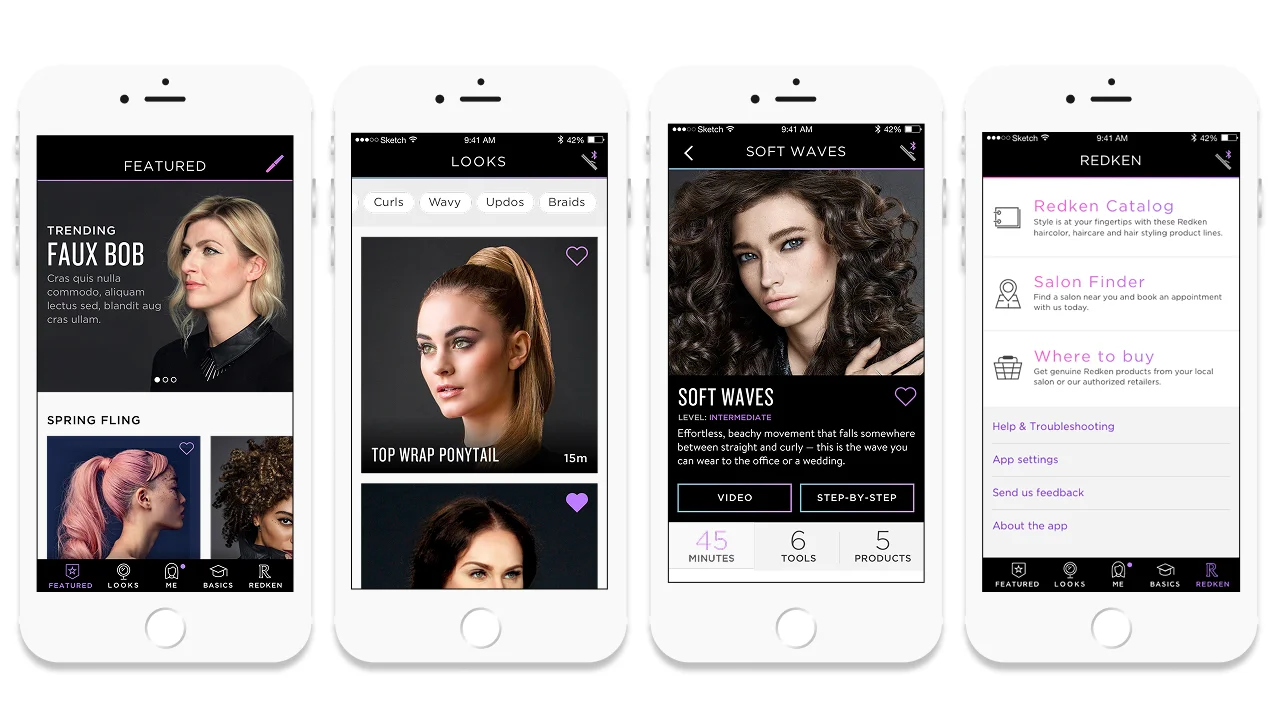
- Look books: the styles users browse and select a tutorial from
- Marketing campaigns: seasonal and promotional content surfaced through the app
- Tutorial content: step and video guidance, plus the success criteria the connected checks measured against
- Profile information: the hair type data driving each mode’s temperature
Finalizing the Tutorial Attributes
That work settled the attributes of the tutorials Redken would create: how a step was structured, when a look called for video over a step card, and what each tutorial had to carry for the app to act on it.
Connecting the App to the Device
The hardware team and my design team then finalized the launch version together.
Profiles built around hair type
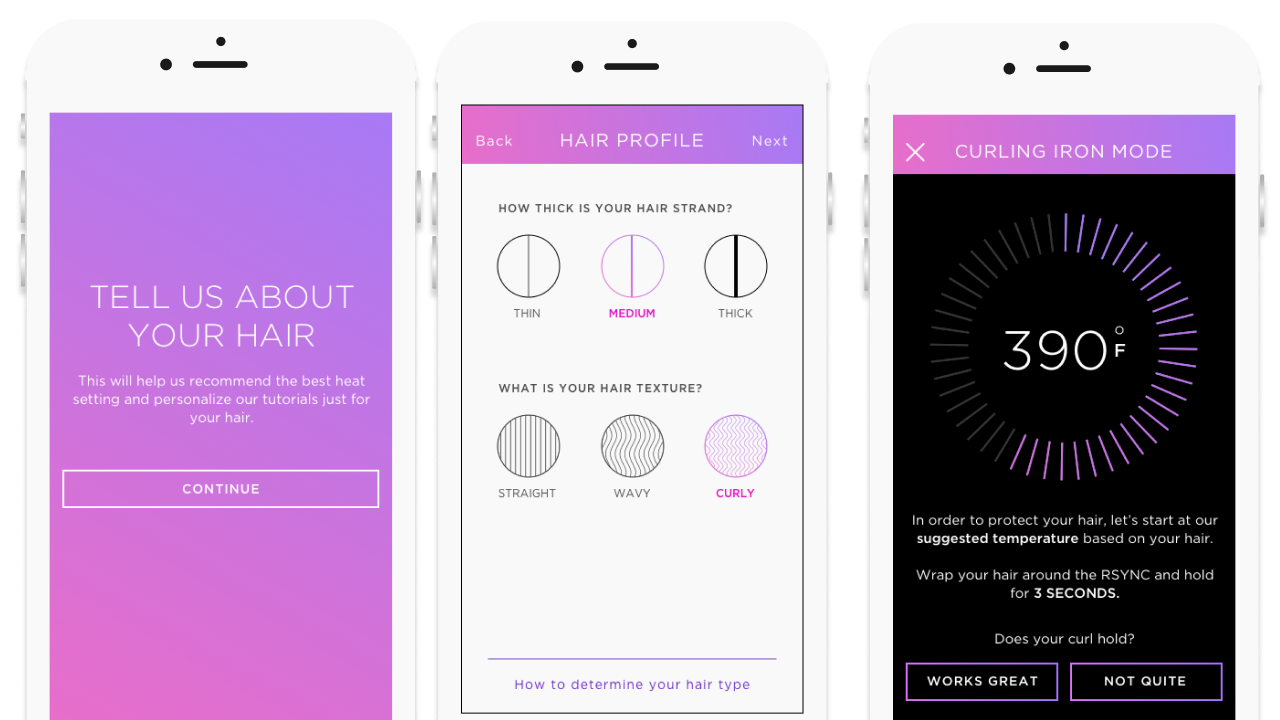
People tend to set a styling tool to its highest heat, assuming that is the fastest route to the result. It is not. Excess heat damages hair and makes the look harder to achieve. So rather than ask the user to guess, the profile finds the answer with them: they describe their hair by thickness and natural wave or curl, and the app returns a starting temperature to try.
From there it becomes a short, guided calibration. The user wraps a section of hair around the wand for three seconds and checks whether the curl holds. If it does not, the app raises the temperature by ten degrees and has them try again, repeating until the curl holds, and that temperature is locked into the profile. The user can run the same calibration for each of the tool’s three modes. The result is a setting arrived at by evidence on that person’s own hair, rather than a number they had to know enough to choose.
Feedback in the app, at the mirror
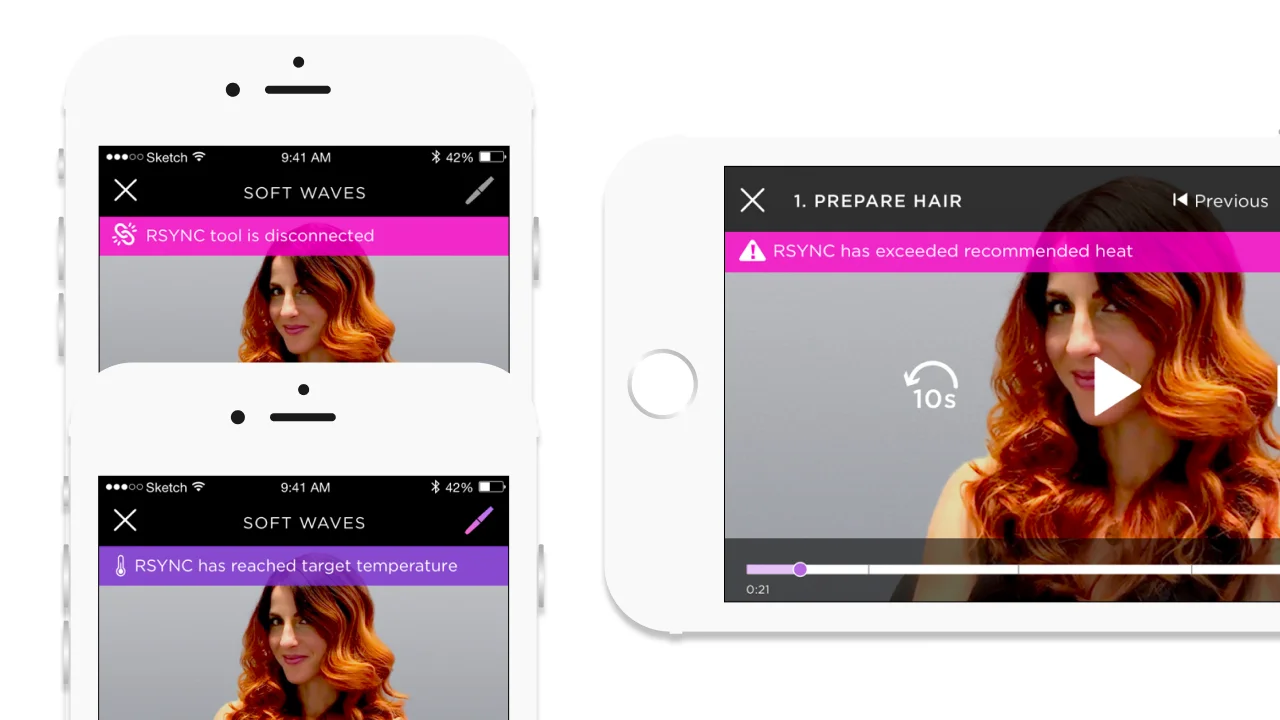
The tool could report mode, temperature, and moisture, and the temptation is to put all of it on screen. The principle was the opposite: show feedback only when it helped someone protect their hair or move to the next step.
That resolved into three moments worth interrupting for: the tool losing its connection, the tool reaching optimal temperature and being ready to use, and the tool running past it, the one case where a warning genuinely protects the hair.
Cues on the device itself
Not everything belonged on the phone. The tool had its own display, speaker, and haptic package, and some feedback lands better from the object in your hand than a screen you look up at, so we designed its visuals, motions, and audio cues alongside the app. The moisture check is the clearest case: the tool senses how wet the hair still is and says whether it is safe to style, in the hand, at the moment of the pass.
Outcome & Influence
The work produced a complete first-generation connected styling tool, tying hardware, content, and mobile UX into a single experience. By the end of my involvement there was a working app, a working content management system, and a device that had passed all of its required testing. The only thing remaining was Redken’s final launch content.
I did not see it through to launch. Sequence was acquired by Salesforce partway through, and the project ran on past the cutoff date the acquisition required of me. By then the hard question was already resolved: what a connected Redken tool should be.
What the Work Delivered
A product definition, not a feature list
Turned a brief for a connected styling device into a defined product: what the app was for, what a first-generation device could realistically deliver, and what to hold back for later
A design language for the product
Three concept directions grounded in Redken’s brand heritage, each presented with the attributes it carried. The selected direction became the visual system the app was built in
An experience proven on real hair
Tutorial guidance tested in context across two rounds and 32 participants, each styling start to finish with the tool in hand rather than reacting to static screens
A working app, not a prototype
Built against hardware that was still evolving and delivered iOS first, then Android: a functioning app that passed the testing required to launch
A buildable spec for the content system
Requirements, data model, and UX design for the CMS, handed to the third-party partner building it, so looks, campaigns, and tutorials could be published on Redken’s own schedule rather than waiting on an app release
One system across app and device
Mapped app UI, CMS content, user action, Bluetooth commands, sensor readings, and the tool’s own display against each other, so both halves behaved as a single product